 I don’t always do predictions posts, even though they’re popular. Most years I skip them because I don’t see major changes in the email space. And, I’m not the type to just write a prediction post just to post a prediction.
This year, though, I do see changes for everyone in the email space. Most of them center on finally having to deal with the technical debt that’s been accumulating over the past few years. I see ISPs and ESPs spending a lot of development effort to cope with the ongoing evolution authentication requirements.
When people started seriously looking at how to authenticate email, the first goal was getting organizations to implement the protocols. This was a practical concession; in order for a new protocol to be used it needs to be widely implemented. Phase one of authenticating email was simply about publishing protocols and getting organizations to use them.
During phase one, the organization that authenticated a mail hasn’t been important. In fact, the SPF spec almost guarantees that the ESP domain is the authenticated domain. In DKIM, the spec says any domain could sign as long as they could publish a public key in that domain’s domainkeys record.
ESPs took full advantage of this and lowered their own development overhead by taking most of the authentication responsibility on themselves. Their domains were in the 5321.from and they published the SPF records. Domains they control were in the d= and they generated and published the DKIM keys. Mail was authenticated without ESP customers having to do much.
We’ve hit the end of phase one. Most of the major players in the email space are authenticating outbound email. Many of the major players are checking authentication on the inbound. Phase one was a success.
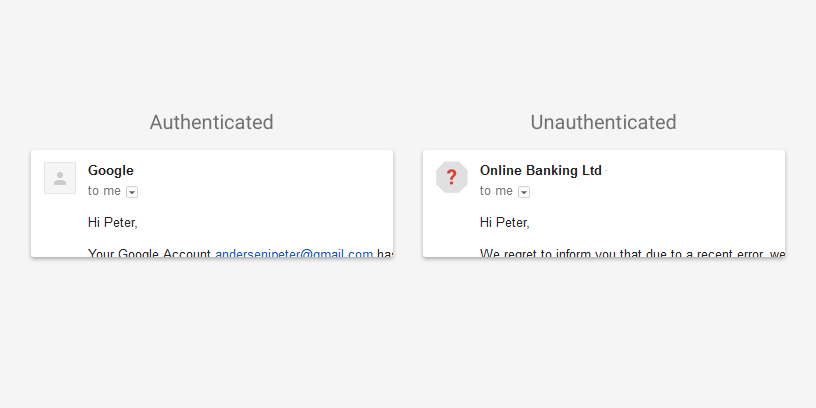
We’re now entering phase two, and that changes thing. In phase two, SPF and DKIM are used as the foundation for user visible authentication. Neither SPF nor DKIM were designed to be user visible protocols. To understand what they’re authenticating you have to understand SMTP and email. Even now there are days when I begin talking about one of them and have to take a step back and think hard about what is being authenticated. And I use these things every day!
DMARC is the first of these end user visible protocols built on SPF and DKIM. It uses the established and widespread authentication to validate the user visible from address. This authentication requires that the d= value or the 5321.from address belong belong to the same domain in the visible from address. While you can pick whether the alignment between the visible from and the authentication is “strict” or “relaxed” you have no choice about the alignment.
Prior to DMARC no one really paid much attention to the domain doing the authentication. Authentication was a yes or a no question. If the answer was yes, then receivers could use the authenticated domain to build a reputation. But they weren’t really checking much in the way of who was doing the authentication.
In the push to deploy authentication, ESPs assumed the responsibility for authentication deployed ESPs took the responsibility and did most of the work. For many or most customers, authentication was as simple as clicking a checkbox during deployment. Some ESPs do currently let customers authenticate the mail themselves, but there’s enough overhead in getting that deployed that they often charged extra to cover the costs.
DMARC is rapidly becoming an expectation or even a full on requirement for inbox delivery. In order to authenticate with DMARC, the authenticating domain must be in the same domain space as the visible from. If senders want to use their own domain in the visible from, DNS records have to be present in that domain space. Whether it’s a SPF TXT record or a domainkeys record the email sender customer needs to publish the correct information in DNS. Even now, if you try to authenticate with DKIM through google apps, they require you to publish DNS records.
ESPs aren’t in a situation where they can effectively manage authentication alignment for all their customers. Hosting companies are in even worse shape when it comes to letting customers authenticate email. Developers are facing the fact they need to go back and rework their authentication code. Businesses are facing the fact they need to change their processes so customers can authenticate with DMARC.
It’s not just the infrastructure providers that are facing challenges with authentication. Senders are going to discover they can no longer hand authentication off to their ESPs and not worry about it. They’re going to have to get DNS records published by their own staff.
Getting DNS updates through some big companies is sometimes more difficult than it should be. I had one client a few years ago where getting rDNS changed to something non-generic took over a month. From an IT standpoint, changing DNS should require approvals and proper channels. Marketers may find this new process challenging.
And, if organizations want to publish reject policies for their domains, then they will have to publish records for every outside provider they use. Some of those providers can’t support DMARC alignment right now.
In 2016 a lot of companies will discover their current infrastructure can’t cope with modern authentication requirements. A lot of effort, both in terms of product development and software development, will need to be spent to meet current needs. This means a lot of user visible features will be displaced while the technical debt is paid.
These changes will improve the security and safety of email for everyone. It won’t be very user visible, which will give the impression this was a slow year for email development. Don’t let that fool you, this will be a pivotal year in email.
Read More