Phishing increasingly sophisticated

Phishing is an online threat that’s been around for more than 20 years. I initially heard of it in relation to spammers taking over an AOL account to send out spam. These days phis is more dangerous and more sophisticated. Phishing is not just used to send spam. It’s used to take over elections; it’s used to steal millions of dollars. Experts estimate that globally phishing costs companies over 9 billion dollars a year.
Even in the last two weeks we’ve seen 2 major phishing incidents. One targeted Google Docs, one targeted Docusign. Reading the news reports these are different than many of the more common phishing attacks and, to me, represent an evolution in standard phishing techniques.

The Google attack in early May was an evolution in getting access to a Google account. Instead of directing users to a fake Gmail login page, the phish asked users to allow “Google Docs” (actually an app controlled by the phisher) to access to their Google account.
I’m sure all of you have used an app or website that lets you login with Facebook or Gmail or Twitter. This is all done with a protocol called OAuth. OAuth is also how you give access to mailbox management tools like I discussed a few weeks ago.  Basically, OAuth lets users grant access and permission to a site or application using a second site without revealing their username and password. (It’s more complicated than I want to discuss, but if you’re looking for some information check out some of the sites I’ve found: wikipedia, Varonis blog, Digital Ocean knowledge base, or just search google for oauth.)
The switch from asking for a password to asking for access is, to my mind, a significant change. Now we have to be aware of what we’re authorizing and make sure that app isn’t malicious.
The Docusign phish is another evolution.  As I was looking at the phish I received yesterday I realized that it was sent to a tagged address. A tagged address only Docusign had. None of my other, heavily phished, addresses received the phish. None of Steve’s addresses received the phish. This wasn’t a widespread spray and pray phishing attack. The phishers targeted Docusign users. Yesterday afternoon, Docusign confirmed that someone stole user addresses.
This is a switch from just randomly looking for victims to targeting users of a specific service.
Phishing attacks look for the weakest links to gain access to computers, information, and money. The weakest links are always humans. Phishers have adapted to security measures for the last 20 years. There is zero reason that they won’t continue to adapt.



Related Posts

ESP attacks, again. Be wary.

There seems to be an uptick in phishing attacks that have an impact on ESPs recently.
Your CEO
The most critical one is targeted spear-phishing attacks that claim to be internal documents sent by senior staff within the company, e.g. from the company CEO.
It’s likely that the attached documents will compromise and backdoor your machine, and from their most of your internal network, using an infected document to load a remote administration tool (RAT) such as Netwire.
Be very, very wary of document attachments, especially in generic looking emails that you weren’t expecting, from senior people. Making sure your antivirus signatures are up to date is a great idea, but nothing will protect you as effectively as not opening the infected documents.
Your domain registrar
The other campaign I’m aware of is emails that claim to be abuse reports from registrars (e.g. opensrs, tucows, etc) aimed at domain registration contacts, claiming that a domain has been suspended and that the recipient should click on a link to “download a copy of complaints received”.
e.g.

Read More

Anatomy of a successful phishing attempt

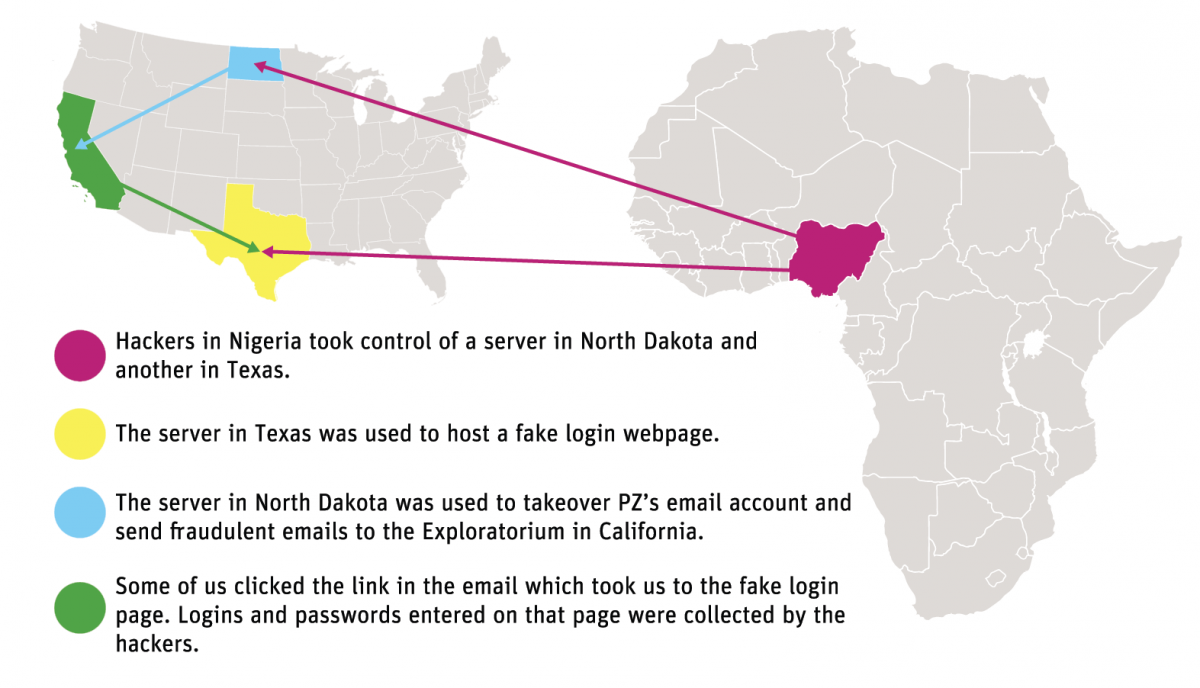
Earlier this year the Exploratorium was the victim of a phishing attack. They’ve posted an article on what happened and how they discovered and dealt with the issue.
But they didn’t just report on the attack, they dissected it. And, as is appropriate for a organization with a mission of education, they mapped out what they discovered during the investigation.

There are a couple of things that stand out to me about this attack. One is that of the more interesting pieces to me is that there was a delay between the compromise and the start of the attack. The Exploratorium calls it “the pivot” and describes it as the hacker deciding what to do next. The second is that the phisher actively interacted with the victim’s account. All new mail was sent to the trash automatically so she wouldn’t see incoming mail. Some mail was actively replied to so more people would click on the message. The phisher took steps to retain access to the account for as long as possible.
One thing that the Exploratorium didn’t see was any actual access to Exploratorium files or information. That may be because the Exploratorium itself wasn’t the target. Once a phisher / hacker has access to the email account, they have access to almost everything in your online life: calendars, bank accounts, credit accounts, the list goes on. Email addresses are our online identity and getting access to the address can open access to so much more.
Quite frankly it can happen to any of us. Earlier this week we received a phishing message that looked very plausible. It came from a law firm, mentioned a subpoena and even had an attachment personalized to our company. The attachment wasn’t opened so we were fine, but I can see how that kind of email might trick someone into getting infected.
We all need to be careful online. Email is a wonderful thing, but it’s insecure. It’s a great way for criminals to get into our space and wreck havoc on our computers and our lives.
 

Read More

Aetna, phishing and security

We’ve just gotten home from M3AAWG and I’m catching up with a lot of the administrative stuff that’s gotten ignored while we were soaking up the tons of information from some of the smartest Internet security folks around. One of the tasks I’m working on is checking on our recent bills from our health insurance provider. Their website seems to be down, so I called them up and asked them if it was down or if something was broken on my end.
They did confirm there was a problem with the site “earlier today” but then started asking me for my account information. They’ve promised to email me a new password because of reasons.
One of the things about M3AAWG is that concentrated discussions about spam and online criminals and security can make everything feel so fragile and security so inadequate to protect us against criminals. I start thinking that everything is compromised. It doesn’t help that websites fail just at the time when I start trying to figure out if my personal information leaked out.
In the course of trying to figure out if there is something wrong at Aetna and if my personal information is safe, I find an article about how poor security is for health companies. “Health companies flunked an email security survey—except Aetna.” Apparently, out of all the health companies out there, Aetna are the only ones fully implementing DMARC on all their mail streams.
The problem is that for the mail I received from Aetna, the visible From: address is AetnaeBilling@aetnagroupbilling.com. This is one of the major vulnerabilities of DMARC. How can I, as a recipient, tell that this is officially mail from Aetna? Any phisher could register “aetnabilling.com” or “aetnagoupbilling.com” or “aetnaebilling.com” and publish DMARC records and use those records to phish customers. Even worse, aetnagroupbilling.com isn’t a SSL registered website.
This is exactly the type of setup a phisher would use to gain access to people’s health insurance accounts. And Aetna offers the ability to draft payments directly from a business checking account, so breaking into the billing account also offers some level of access to the business money.
Do I think this is a phish? No.
Do I think the average person would be able to tell that? No.
There’s got to be a better way to secure folks online.

Read More