Tell us about how you use Gmail Postmaster Tools

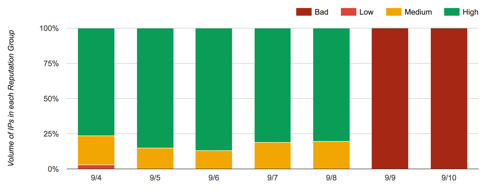
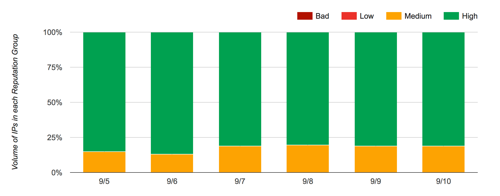
One of the things I hear frequently is that folks really want access to Google Postmaster Tools through an API. I’ve also heard some suggestions that we should start a petition. I thought a better idea was to put together a survey showing how people are using GPT and how high the demand is for an API.
They’re a data company, let’s give them data.

I’ve put together a survey looking at how people are using GPT. It’s 4 pages and average time to take the survey is around 7 minutes. Please give us your feedback on GPT usage.
I’m planning on leaving the survey open through the first week in November. Then I’ll pull data together and share here and with Google.

Related Posts

Gmail shows authentication data to the recipient

Yesterday Gmail rolled out some changes to their interface. One of the changes is that they are now showing end users authentication results in the user screen.
It’s really the next step in email authentication, showing the results to the end user.
So how does Google do this? Google is checking both SPF and DKIM. If mail is authenticated and the authentication matches the from address then they display the email as:
mail from steve to me
If we click on “details” for that message, we find more specific information.
full details of message showing signing domain and spf domainIn this case the mail went through our outgoing mailserver to gmail.
Mailed-by indicates that the message passed SPF and that the IP address is a valid source of mail from wordtothewise.com.
Signed-by shows the domain in the DKIM d=. In this case, we signed with the subdomain dt.wordtothewise.com. That’s what happens when you sign using the domain in the From address (or a subdomain of it).
For a lot of bulk senders, though, their mail is signed using their ESP’s domain instead.  In that case Gmail shows who signed the mail as well as the from address.

And when we click on “details” for that message we see:
3rd party signature detailsThis is an email from a sender using Madmimi as an ESP. Madmimi is handling both the SPF authentication and the DKIM authentication.
As an aside, this particular  sender has a high enough reputation that Gmail is offering me an unsubscribe option in their interface.
Gmail is distinguishing between first party and third party signatures in authentication. If the mail is authenticated, but the authentication appears to be handled by a separate entity, then Gmail is alerting recipients to that fact.
What does this mean for bulk senders?
For senders that are signing with a domain that matches their From: domain, there is no change. Recipients will not see any mention of your ESP in the headers.
However, if you are using an ESP that is signing your mail with a domain they own, then your recipients will see that information displayed in the email interface. If you don’t want this to be displayed by Gmail, then you will need to move to first party signing. Talk to your ESP about this. If they’re unsure of how to manage it, you can point them to DKIM Core for an Email Service Provider.
Gmail blogpost about the changes
Gmail help page about authentication results

Read More


Email marketing OF THE FUTURE!

ISPs are continually developing tools for their users. Some of the newer tools are automatic filters that help users organize the volumes of mail they’re getting. Gmail released Priority Inbox over a year ago. Hotmail announced new filters as part of Wave 5 back in October.
All of these announcements cause much consternation in the email marketing industry. Just today there was a long discussion on the Only Influencers list about the new Hotmail filtering. There was even some discussion about why the ISPs were doing this.
I think it’s pretty simple why they’re creating new tools: users are asking for them. The core of these new filters is ISPs reacting to consumer demand. They wouldn’t put the energy into development if their users didn’t want it. And many users do and will use priority inbox or the new Hotmail filtering.
Some people are concerned that marketing email will be less effective if mail is not in the inbox.

Read More

Parasites hurt email marketing

As a small business owner I am a ripe target for many companies. They buy my address from some lead generation firm, or they scrape it off LinkedIn, and they send me a message that pretends to be personalized but isn’t really.
“I looked at your website… we have a list of email addresses to sell you.”
“We offer cold calling services… can I set up a call with you?”
“I have scheduled a meeting tomorrow so I can tell you about our product that will solve all your technical issues and is also a floor wax.”
None of these emails are anything more than spam. They’re fake personalized. There’s no permission. On a good day they’ll have an opt out link. On a normal day they might include an actual name.
These are messages coming to an email address I’ve spent years trying to protect from getting onto mailing lists. I don’t do fishbowls, I’m careful about who I give my card to, I never use it to sign up for anything. And, still, that has all been for naught.
I don’t really blame the senders, I mean I do, they’re the ones that bought my address and then invested in business automation software that sends me regular emails trying to get me to give them a phone number. Or a contact for “the right person at your business to talk to about this great offer that will change your business.”
The real blame lies with the people who pretend that B2B spam is somehow not spam. Who have pivoted their businesses from selling consumer lists to business lists because permission doesn’t matter when it comes to businesses. The real blame lies with companies who sell “marketing automation software” that plugs into their Google Apps account and hijacks their reputation to get to the inbox. The real blame lies with list cleansing companies who sell list buyers a cleansing service that only hides the evidence of spamming.
There are so many parasites in the email space. They take time, energy and resources from large and small businesses, offering them services that seem good, but really are worthless.
The biologically interesting thing about parasites, though, is that they do better if they don’t overwhelm the host system. They have to stay small. They have to stay hidden. They have to not cause too much harm, otherwise the host system will fight back.
Email fights back too. Parasites will find it harder and harder to get mail delivered in any volume as the host system adapts to them. Already if I look in my junk folder, my filters are correctly flagging these messages as spam. And my filters see a very small portion of mail. Filtering companies and the business email hosting systems have a much broader view and much better defenses.
These emails annoy me, but I know that they are a short term problem.  As more and more businesses move to hosted services, like Google Apps and Office365 the permission rules are going to apply to business addresses as well as consumer addresses. The parasites selling products and services to small business owners can’t overwhelm email. The defenses will step in first.
 

Read More