SPF and TXT records and Go

A few days ago Laura noticed a bug in one of our in-house tools – it was sometimes marking an email as SPF Neutral when it should have been a valid SPF pass. I got around to debugging it today and traced it back to a bug in the Go standard library.

A DNS TXT record seems pretty simple. You lookup a hostname, you get some strings back. Those strings can be used for all sorts of things, but one of them is to store SPF records – you can recognize a TXT record being used for that because the string returned starts with “v=spf1”

In reality it’s a little more complicated than that, though. You might get multiple TXT records back in response to a single query. And each of those TXT records might contain multiple strings.

Because of the way TXT records are implemented each string in one can be no more than 255 characters long. If your SPF record is longer than that you can split it into multiple fragments – usually just two, as you want to keep the whole DNS response less than 512 bytes – and the SPF checker will join all those fragments into a single string before parsing it as an SPF record.

(It joins them together without any extra spaces, so don’t do this: v=spf1 ip4:10.11.12.13” “ip4:192.168.100.12. The SPF checker would join those two strings into “v=spf1 ip4:10.11.12.13ip4:192.168.100.12”, which wouldn’t be valid. Doing this isn’t an uncommon mistake.)

The relevant SPF record was … take a deep breath …

v=spf1 ip4:64.132.92.0/24 ip4:64.132.88.0/23 ip4:66.231.80.0/20 ip4:68.232.192.0/20 ip4:199.122.120.0/21 ip4:207.67.38.0/24 ” “ip4:207.67.98.192/27 ip4:207.250.68.0/24 ip4:209.43.22.0/28 ip4:198.245.80.0/20 ip4:136.147.128.0/20 ip4:136.147.176.0/20 ip4:13.111.0.0/16 ip4:13.111.64.0/24 ip4:13.111.65.0/24 -all

You can see that’s split into two fragments. Any mail coming from an IP address in the second fragment was failing SPF (according to the SPF library I was using). Why?

The Go library call to look up a TXT record is, reasonably enough, net.LookupTXT(). It returns a list of strings ([]string, in Go-speak).

The SPF code then iterates through each string and throws away anything that doesn’t start with “v=SPF1”, as there’s often all sorts of non-SPF TXT records in a domain. Then it parses what’s left and makes a decision as to whether the mail matches the SPF record or not.

That was fine as net.LookupTXT() would return one string for each TXT record, containing all the strings concatenated together, perfect for SPF.

But in a recent Go release (1.11.0) someone changed that function so that instead of returning one string containing both fragments joined together, it returned two strings, each containing one fragment.

The SPF checker saw the first string started with “v=SPF1” and treated it as valid, but the second string didn’t so the SPF checker threw it away. So only emails that were from IP addresses in the first fragment were considered valid.

net.LookupTXT() has been fixed in Go 1.11.1, so I updated my compiler, rebuilt the code and the bug went away.

But only seeing the first fragment of a TXT record isn’t an implausible bug. I’m going to bear it in mind when I’m trying to work out why something that’s obviously valid is failing SPF at an obscure destination.
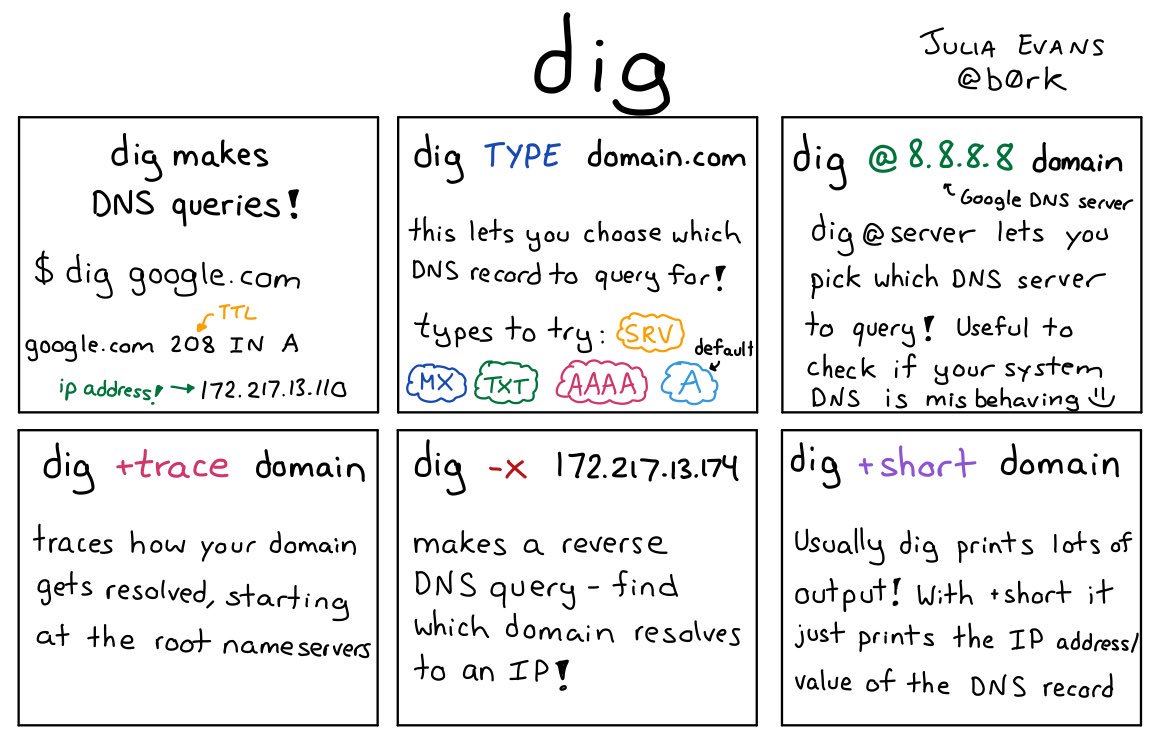
Only tangentially SPF related, but I saw this great infographic today

(only tangentially related to SPF, but it’s a great infographic I saw today)

Related Posts

Are they using DKIM?

It’s easy to tell if a domain is using SPF – look up the TXT record for the domain and see if any of them begin with “v=spf1”. If one does, they’re using SPF. If none do, they’re not. (If more than one does? They’re publishing invalid SPF.)
AOL are publishing SPF. Geocities aren’t.
For DKIM it’s harder, as a DKIM key isn’t published at a well-known place in DNS. Instead, each signed email includes a “selector” and you look up a record by combining that selector with the fixed string “._domainkey.” and the domain.
If you have DKIM-signed mail from them then you can find the selector (s=) in the DKIM-Signature header and look up the key. For example, Amazon are using a selector of “taugkdi5ljtmsua4uibbmo5mda3r2q3v”, so I can look up TXT records for “taugkdi5ljtmsua4uibbmo5mda3r2q3v._domainkey.amazon.com“, see that there’s a TXT record returned and know there’s a DKIM key.
That’s a particularly obscure selector, probably one they’re using to track DKIM lookups to the user the mail was sent to, but even if a company is using a selector like “jun2016” you’re unlikely to be able to guess it.
But there’s a detail in the DNS spec that says that if a hostname exists, meaning it’s in DNS, then all the hostnames “above” it in the DNS tree also exist (even if there are no DNS records for them). So if anything,_domainkey.example.com exists in DNS, so does _domainkey.example.com. And, conversely, if _domainkey.example.com doesn’t exist, no subdomain of it exists either.
What does it mean for a hostname to exist in DNS? That’s defined by the two most common responses you get to a DNS query.
One is “NOERROR” – it means that the hostname you asked about exists, even if there are no resource records returned for the particular record type you asked about.
The other is “NXDOMAIN” – it means that the hostname you asked about doesn’t exist, for any record type.
So if you look up _domainkey.aol.com you’ll see a “NOERROR” response, and know that AOL have published DKIM public keys and so are probably using DKIM.
(This is where Steve tries to find a domain that isn’t publishing DKIM keys … Ah! Al’s blog!)
If you look up _domainkey.spamresource.com you’ll see an “NXDOMAIN” response, so you know Al isn’t publishing any DKIM public keys, so isn’t sending any DKIM signed mail using that domain.
This isn’t 100% reliable, unfortunately. Some nameservers will (wrongly) return an NXDOMAIN even if there are subdomains, so you might sometimes get an NXDOMAIN even for a domain that is publishing DKIM. shrug
Sometimes you’ll see an actual TXT record in response – e.g. Yahoo or EBay – that’s detritus left over from the days of DomainKeys, a DomainKeys policy record, and it means nothing today.

Read More

SPF Fail: too many DNS lookups

I’ve had a couple folks come to me recently for help troubleshooting SPF failures. The error messages said the SPF record was invalid, but by all checks it was valid.
Eventually, we tracked the issue down to how many include files were in the SPF record.
The SPF specification specifically limits the number of lookups that can happen during a SPF check.

Read More

DNS, SERVFAIL, firewalls and Microsoft

When you look up a host name, a mailserver or anything else there are three types of reply you can get. The way they’re described varies from tool to tool, but they’re most commonly referred to using the messages dig returns – NXDOMAIN, NOERROR and SERVFAIL.
NXDOMAIN is the simplest – it means that there’s no DNS record that matches your query (or any other query for the same host name).
NOERROR is usually what you’re hoping for – it means that there is a DNS record with the host name you asked about. There might be an exact match for your query, or there might not, you’ll need to look at the answer section of the response to see. For example, if you do “dig www.google.com MX” you’ll get a NOERROR response – because there is an A record for that hostname, but no answers because there’s no MX record for it.
SERVFAIL is the all purpose “something went wrong” response. By far the most common cause for it is that there’s something broken or misconfigured with the authoritative DNS for the domain you’re querying so that your local DNS server sends out questions and never gets any answers back. After a few seconds of no responses it’ll give up and return this error.
Microsoft
Over the past few weeks we’ve heard from a few people about significant amounts of delivery failures to domains hosted by Microsoft’s live.com / outlook.com, due to SERVFAIL DNS errors. But other people saw no issues – and even the senders whose mail was bouncing could resolve the domains when they queried Microsofts nameservers directly rather than via their local DNS resolvers. What’s going on?
A common cause for DNS failures is inconsistent data in the DNS resolution tree for the target domain. There are tools that can mechanically check for that, though, and they showed no issues with the problematic domains. So it’s not that.
Source ports and destination ports
If you’re even slightly familiar with the Internet you’ve heard of ports – they’re the numbered slots that servers listen on to provide services. Webservers listen on port 80, mailservers on port 25, DNS servers on port 53 and so on. But those are just the destination ports – each connection comes from a source port too (it’s the combination of source port and destination port that lets two communicating computers keep track of what data should go where).
Source ports are usually assigned to each connection pretty much randomly, and you don’t need to worry about them. But DNS has a history of the source port being relevant (it used to always use source port 53, but most servers have switched to using random source ports for security reasons). And there’s been an increasing amount of publicity about using DNS servers as packet amplifiers recently, with people being encouraged to lock them down. Did somebody tweak a firewall and break something?
Both source and destination ports range between 1 and 65535. There’s no technical distinction between them, just a common understanding that certain ports are expected to be used for particular services. Historically they’ve been divided into three ranges – 1 to 1023 are the “low ports” or “well known ports”, 1024-49151 are “registered ports” and 49152 and up are “ephemeral ports”. On some operating systems normal users are prevented from using ports less than 1024, so they’re sometimes treated differently by firewall configurations.
While source ports are usually generated randomly, some tools let you assign them by hand, including dig. Adding the flag -b "0.0.0.0#1337" to dig will make it send queries from  source port 1337. For ports below 1024 you need to run dig as root, but that’s easy enough to do.
A (slightly) broken firewall
sudo dig -b "0.0.0.0#1024" live.com @ns2.msft.net” queries one of Microsofts nameservers for their live.com domain, and returns a good answer.
sudo dig -b "0.0.0.0#1023" live.com @ns2.msft.net” times out. Trying other ports above and below 1024 at random gives similar results. So there’s a firewall or other packet filter somewhere that’s discarding either the queries coming from low ports or the replies going back to those low ports.
Older DNS servers always use port 53 as their source port – blocking that would have caused a lot of complaints.
But “sudo dig -b "0.0.0.0#53" live.com @ns2.msft.net” works perfectly. So the firewall, wherever it is, seems to block DNS queries from all low ports, except port 53. It’s definitely a DNS aware configuration.
DNS packets go through a lot of servers and routers and firewalls between me and Microsoft, though, so it’s possible it could be some sort of problem with my packet filters or firewall. Better to check.
sudo dig -b "0.0.0.0#1000" google.com @ns1.google.com” works perfectly.
So does “sudo dig -b "0.0.0.0#1000" amazon.com @pdns1.ultradns.net“.
And “sudo dig -b "0.0.0.0#1000" yahoo.com @ns1.yahoo.com“.
The problem isn’t at my end of the connection, it’s near Microsoft.
Is this a firewall misconfiguration at Microsoft? Or should DNS queries not be coming from low ports (other than 53)? My take on it is that it’s the former – DNS servers are well within spec to use randomly assigned source ports, including ports below 1024, and discarding those queries is broken behaviour.
But using low source ports (other than 53) isn’t something most DNS servers will tend to do, as they’re hosted on unix and using those low ports on unix requires jumping through many more programming hoops and involves more security concerns than just limiting yourself to ports above 1023. There’s no real standard for DNS source port randomization, which is something that was added to many servers in a bit of a hurry in response to a vulnerability that was heavily publicized in 2008. Bind running on Windows seems to use low ports in some configurations. And even unix hosted nameservers behind a NAT might have their queries rewritten to use low source ports. So discarding DNS queries from low ports is one of the more annoying sorts of network bugs – one that won’t affect most people at all, but those it does affect will see it much of the time.
If you’re seeing DNS issues resolving Microsoft hosted domains, or you’re seeing patterns of unexpected SERVFAILs from other nameservers, check to see if they’re blocking queries from low ports. If they are, take a look and see what ranges of source ports your recursive DNS resolvers are configured to use.
(There’s been some discussion of this recently on the [mailop] mailing list.)

Read More