Identifying domains that don’t accept or send email

A couple folks have asked me recently about MX records that they don’t understand. These records consist of a single . or they contain localhost or they are 127.0.0.1.

In all cases, the domain owners use these records to signal that the domains don’t accept email. What do these records look like?
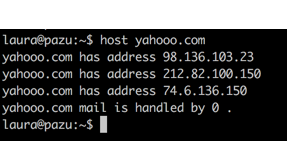
screenshot of a terminal session that says: 
laura@pazu:~$ host yahooo.com
yahooo.com has address 98.136.103.23
yahooo.com has address 212.82.100.150
yahooo.com has address 74.6.136.150
yahooo.com mail is handled by 0 .

Why do domains do this? In all cases it’s because the domain owners want to signal they don’t accept email. But there are a number of different reasons to do this.

In the yahooo.com example, this is a domain actually owned by Yahoo. The website redirects to the primary yahoo.com site. But, it’s not a domain that accepts mail. They notify us of this by using a dot mx.
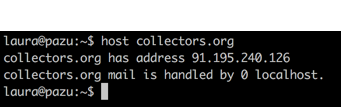
Screenshot of a terminal session that says: 
laura@pazu:~$ host collectors.org
collectors.org has address 91.195.240.126
collectors.org mail is handled by 0 localhost.

In the collectors.org example, they list the MX as localhost. This is a convention I’ve seen from a lot of for-sale domains. (As an aside, some of the for sale domains do accept email. The ones I’ve identified use a handful of common MXs that I suspect belong to the companies that sell access to spamtraps.)

I’ve also seen some domains use 127.0.0.1 as a MX record. Again, this is signalling that they really, really don’t want to accept email.

There’s also a way to signal a domain doesn’t send mail. This is accomplished by using a SPF -all record.
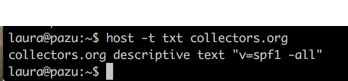
Screenshot of a terminal session that says:
laura@pazu:~$ host -t txt collectors.org
collectors.org descriptive text "v=spf1 -all"

There you go. Multiple ways to signal a domain doesn’t accept email and one way to signal the domain never sends email.

Related Posts

Data hygiene and bouncing zombies

There are a number of folks who tell me there can be no zombie addresses on their lists, they aggressively remove any address that bounces. The problem is that zombie addresses don’t bounce, at least not always. And even when ISPs say they have a policy to bounce email after a certain period of time with no access, that’s not always put into practice.
How do I know that ISPs don’t always deactivate addresses on the schedules they publish? Because I have seen addresses not be deactivated.
I have addresses in a lot of places that I go for long periods of time not checking. It’s rare that they’re taken from me or reject mail – most of the time they’re special test addresses I use when diagnosing issues. This post is based on my experiences with those addresses and how abandoned addresses are treated at some ISPs.
For Gmail I have two examples of addresses not being deactivated.
In July 2011, we set up a test address to look at how Gmail was handling authentication. We sent a matrix of different test emails to it, with valid and invalid SPF and DKIM signatures. We pulled the data from the account. I don’t know for certain when the last time I logged in, but it was August or September of last year. So we have an address that has been dormant since September 2011.
I just sent mail to the account and google happily accepted it.
Mar  2 07:03:22 misc postfix/smtp[11770]: 11CA12DED3: to=<wttwtestacct@gmail.com>, relay=gmail-smtp-in.l.google.com[74.125.127.27]:25, delay=1.8, delays=0.25/0.02/0.56/0.93, dsn=2.0.0, status=sent (250 2.0.0 OK 1330700602 x8si8608852pbi.66)
I have another google account (apparently) that my records show I set up sometime in 2010. The login info was saved October 2010. I don’t know when the last time I logged in was, but given I’d forgotten the existence of the account it’s a good bet that it has been more than a year. That account is also accepting mail as of today.
Mar  2 07:06:25 misc postfix/smtp[11836]: 8D90C2DED3: to=<phphendrie@gmail.com>, relay=gmail-smtp-in.l.google.com[74.125.127.27]:25, delay=1.6, delays=0.26/0.02/0.68/0.66, dsn=2.0.0, status=sent (250 2.0.0 OK 1330700785 a8si4075740icw.96)
For Hotmail I also have quite a bit of history and information. I signed up for my first Hotmail account in 1997. That was an account I used the address to post to usenet, but I didn’t actually use it for mail. I’d check it occasionally (usually when someone said in the newsgroup that they were going to email me) but it wasn’t an address I used regularly. As I moved from posting regularly in usenet, I started checking that account even less.
For a while, if I went more than 6 months checking my Hotmail account they would make me “re-claim” it. What would happen when I’d log in is I’d get a message along the lines of “well, we disabled this account due to inactivity, do you want it back?” I’d say yes, have to go through the setup process again and it would be my account. Mail was deleted during the disabling, and I am guessing they rejected anything new going to that account. I went through this dance for 4 or 5 years. I even had my calendar set to remind me to login every 6 months or so. There was some sentimental value to the address that kept me logging in. I have that same username at every major free ISP: Gmail, Hotmail, Yahoo and AOL, so it’s “my” address.
About 6 or 7 years ago, that behavior changed. I stopped getting the request to reclaim my account. Instead I could just log in. I’d still have mail (mostly spam as the address is on *lots* of lists and millions CDs). I still check it irregularly. I don’t have any idea when the last time I checked it was, but I think it’s been since at least November and probably longer back than that. Hotmail is still accepting mail for that address as well.
It’s anecdotal evidence, at best, but it ‘s the type of evidence that is acceptable even when it’s anecdotal. There are some addresses that are abandoned for long periods of time at the free mailbox providers and they’re are not all automatically pulled from the ranks of active addresses.
What does this mean for senders? It means that data hygiene has to go beyond just removing addresses that bounce. ISPs are not disabling addresses consistently enough for marketers to be able to trust that all addresses on their list are active just because they are accepting email.
This is the root of the recommendation to put in a hygiene program, this is why senders need to look at who is actually engaged with their brand and make some hard decisions about shooting zombies in the head.

Read More

Purging to prevent spamtraps

Someone recently asked when they should purge addresses to remove spamtraps. To my mind this is actually the wrong question. Purging addresses that don’t engage is rarely about spamtraps, it’s about your overall communication processes.

Read More

10 things every mailer must do

A bit of a refresh of a post from 2011: Six best practices for every mailer. I still think best practices are primarily technical and that how senders present themselves to recipients is more about messaging and branding than best practices. These 6 best practices from 2011 are no longer best, these days, they’re the absolute minimum practices for senders.

If you can’t manage to do these, then find someone who can.

Read More